






















Download & sign in
Download GPSLarp and run the installer. It opens your browser once to sign in — then your first run of each mode is on us.
iPhone location changer · macOS / Apple Silicon
iPhone location changer · Windows 10 / 11 · 64-bit
GPSLarp is an iPhone location changer that runs on your Mac or Windows PC. It overrides the GPS location your iPhone reports over Wi-Fi or USB — so an app that asks the system where your phone is reads the coordinates you chose instead. Search a city, drop a pin, or pick a saved spot — the change takes effect on your phone instantly.
Downloads and requirements below follow this choice.
GPSLarp runs on a Mac or a Windows PC — your iPhone connects to it over Wi-Fi or USB. Open this page on your computer to download it.
Change your iPhone's GPS location in one click. Search any city, landmark, or raw coordinates, click the map, and confirm — the new position applies instantly.
Pick a start and a destination and GPSLarp walks the real street route — every turn, at a pace you set. Leave it alone for a steady 1.4 m/s, or give it anything from 1.5 to 15 km/h and the whole journey is timed at that figure.
Same real routes, driving speed: 10 to 160 km/h typed exactly, or a traffic setting that hands the pace back to the route planner's own estimate for those streets.
Two things on the iPhone have to be true before any of this works. GPSLarp goes looking for both over the ordinary connection — no administrator prompt, no Xcode — and tells you which one it could not confirm, before anything asks you to type a password.
Chain several stops into one walk or drive — click a start, click each stop in visiting order, and GPSLarp routes real streets between every pair into one continuous journey, rather than three separate ones.
Nudge your position live with an on-screen pad — hold a direction and drift a few metres at a time.
Keep a library of go-to spots — Area 51, the Bermuda Triangle, or your own house — and re-apply any of them in one click.
Stop the override whenever you like — no restart, and nothing was installed on the phone to remove. GPSLarp asks your iPhone to take its own GPS back, then tells you whether it did.
The value that changes is the phone's own location, not something patched into one app — so anything that asks the system where you are reads what you set, with nothing installed on the iPhone.
Pair once over Wi-Fi or keep a cable in — your computer holds the tunnel either way while you use your phone.
48.8767° S, 123.3933° W
Download it free and sign in once — then every mode runs once on us: teleport, walk, drive, joystick. No credit card and no trial countdown. Keep going for CHF 4.90 a month or CHF 39.00 a year, each renewing until you cancel.
CHF4.90per monthBilled monthly until you cancel
CHF39.00per yearRenews every year until you cancel33% less than twelve months at CHF 58.80
Teleport, walk, drive, joystick — each one free once, so you can see it work on your own phone before paying anything. No credit card; the free runs are counted against the account you sign in with on first run.
Every mode, no run limit, on any computer you sign in from. Whichever you pick, the charge repeats every month or every year until you stop it.
Cancel from your account in a click. No notice period, no cancellation fee — the subscription stops renewing and you keep every mode until the period you paid for runs out.
There is no lifetime licence, and that is deliberate. GPSLarp works by driving Apple's own device protocol, which is not a public, supported interface — keeping the app working across iOS releases is recurring engineering, and a one-off payment cannot fund a cost that does not stop.
CHF 4.90 a month or CHF 39.00 a year. We add no VAT — the operator is not registered for it. Payment and cancellation run through Stripe, and the total it shows before you confirm is the amount charged. You can withdraw within 14 days of subscribing; the terms have the detail.
GPSLarp runs on a Mac or a Windows PC — your iPhone connects to it over Wi-Fi or USB. Open this page on your computer to download it.
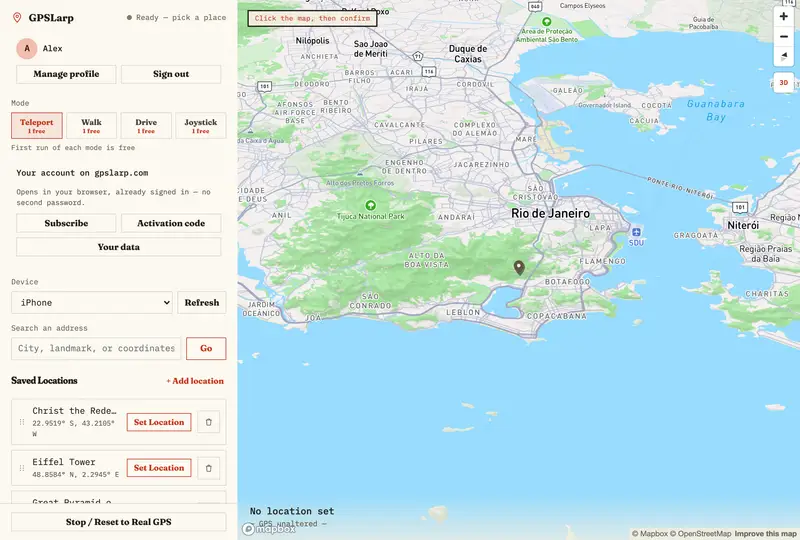
Type a place or drop a pin on the map, hit confirm, and the desktop app holds the connection to your iPhone — over Wi-Fi or a USB cable — active in the background while you use any other app on your phone.
22.9519° S, 43.2105° W
Download GPSLarp and run the installer. It opens your browser once to sign in — then your first run of each mode is on us.
Pair over Wi-Fi or plug in a USB cable, then approve the one-time permission prompt.
Search a place, click the map, or tap a saved location, then hit Confirm to change your iPhone's location.
Keep the app open in the background to hold the override active across every app.
One free run of every mode. No credit card — the app asks you to sign in on first run.
GPSLarp runs on a Mac or a Windows PC — your iPhone connects to it over Wi-Fi or USB. Open this page on your computer to download it.
Read the full guideGPSLarp drives Apple's own developer location-simulation surface over a RemoteXPC tunnel — the same device-development protocol Xcode and Apple Configurator use. It runs without a project open, without a build running and without the debugger attached: GPSLarp starts and holds the tunnel itself, so nothing else has to stay open while it does.
Plan a route and give it a speed — 1.5 to 15 km/h on foot, 10 to 160 km/h driving, typed exactly rather than dragged. The same route is sent at the same pace every time.
Chain an ordered list of points into one continuous run, so a commute, a delivery round or three geofence crossings are a single journey rather than three separate ones.
A readiness check reads Developer Mode and the developer disk image over the ordinary connection — no elevation, no tunnel, no Xcode — and names whichever of the two it could not confirm.
No profile is installed on the iPhone and nothing is patched: what changes is the value the system reports for its own position, and GPSLarp stops asserting it the moment you stop.
Downloads and requirements below follow this choice.
No. GPSLarp talks to your iPhone over Apple's own device-development protocol — the same one Xcode and Apple Configurator use — through a secure tunnel from your computer. No jailbreak, no root, no modified iOS.
GPSLarp doesn't jailbreak, modify iOS, or install a profile on your iPhone — it only holds a connection open and tells your phone which coordinates to report. Your administrator password is used once, locally, to start the connection helper, and is never sent anywhere.
Those are three names for one thing, and GPSLarp does it from your computer — a Mac or a Windows PC — rather than from the phone: it changes the GPS location your iPhone reports, without a jailbreak, so every app on the phone reads the coordinates you picked instead of where you are. No modified iOS and no profile installed on your iPhone either. Stop the app and the override ends — GPSLarp asks your iPhone to take its own GPS back, and tells you whether it did.
That depends on the app you're using, not on GPSLarp. GPSLarp changes what your iPhone reports at the system level, so any app reads it exactly like a real GPS fix — but some apps run their own detection and enforce their own terms against location spoofing regardless of method. We can't promise immunity from another company's ban policy, so check what matters to you before relying on this for it.
Any app that reads your iPhone's system location, because they all read the same value GPSLarp overrides — maps, social apps, fitness trackers, games, dating apps. We don't publish a list of app names, and that's a decision rather than an oversight: nothing here has been tested against any specific app, so a list would be a compatibility claim we can't stand behind. Two things are more useful than a list. An app that works out where you are from your IP address, your account region or your SIM isn't reading the system location at all, and won't change. And some apps run their own spoofing checks and enforce their own terms regardless of method — see the ban question above.
It needs iOS 17 or later, and it needs Developer Mode switched on in the phone's settings. GPSLarp isn't built on a jailbreak exploit for one particular firmware, so there's no version-by-version exploit behind it to go stale — but iOS 17 is a floor, and on an older iPhone the app says so rather than guessing. Developer Mode is the part worth knowing before you buy: it is off by default on every iPhone, iOS won't let any app — GPSLarp, Xcode or anything else — change the location your phone reports until it's on, and you switch it on yourself under Settings, Privacy & Security, because iOS won't let a computer do it for a phone that has a passcode. Turning it on restarts the phone; that's iOS's requirement, not ours, and it's a one-time step. iOS also wants a small developer support file from Apple — the developer disk image — present before it will accept a simulated location. GPSLarp checks whether it is there and tells you if it isn't; putting it there is a separate step, and the help centre walks through it.
It's almost always one of three things. The location tunnel has to be running on your computer — that's the single administrator prompt, and nothing is detected until you approve it. The iPhone has to have been plugged in and unlocked at least once, so the two are paired to each other. And over Wi-Fi it has to be on the same network as the computer. If it still doesn't appear, connect the cable and unlock the phone once — that covers the pairing and the network in one go. One thing none of that fixes: the iPhone has to be running iOS 17 or later, which is GPSLarp's floor.
The override ends with the app, and lasts only as long as GPSLarp is open and holding the connection — no reboot, and nothing was installed on the phone to remove. GPSLarp asks your iPhone to take its own GPS back and then tells you whether it did: there are two messages for when the phone did not acknowledge it, one where it refused and one where it could not be reached, and each names what to do next.
Windows yes, Intel Mac no. There is a Windows 10 and 11 build for 64-bit PCs and you can download it from this page with the platform switch above; on a Mac, Apple Silicon — M1 or later — is a hard requirement rather than a recommendation, and there is no Intel build. One thing worth knowing before you download the Windows one: we build and publish it from the same source as the Mac version, but nobody here has yet run it on a Windows machine with an iPhone attached, and it carries no Windows publisher signature, so Windows will warn you that the publisher is unverified when you open the installer. The Mac build is the one that has been used.
Only if you opt in. Beyond app version and platform, GPSLarp asks separately about location analytics — coordinates tied to your account — and it defaults to off. The server keeps its own record of that answer and strips coordinates when it says no, so the setting is enforced rather than trusted. Turning it off doesn't limit any feature.
To download it, no — the installer asks for nothing. To use it, yes: the app opens your browser once to sign in with an email address, Apple, Google or GitHub. Your free run of each mode is counted against that account, which is also what lets you export or delete everything we hold. Subscribing and redeeming an activation code use the same account.
Every account gets one free run of each mode — one teleport, one walk, one drive, one joystick session — with no credit card. Keeping it after that costs CHF 4.90 a month or CHF 39.00 a year. Either one is a subscription, not a one-off: it renews and charges again at the end of each period until you cancel it. We add no VAT to that price, and the total Stripe shows you before you confirm is the amount charged.
No — GPSLarp is sold as a subscription, monthly or yearly, and there is no perpetual licence. The reason is the mechanism rather than the margin: the app works by driving Apple's own device protocol, which is not a public, supported interface, so keeping it working across iOS releases is recurring engineering rather than a one-time build. We would rather charge while that work is happening than take a single payment for an obligation with no end date. Either plan can be cancelled whenever you like, and nothing renews after that.
You cancel from your account, on the billing page Stripe runs for us — no email, no notice period, no cancellation fee. The subscription stops renewing immediately, and you keep every mode until the end of the period you have already paid for — the month or the year, depending on which plan you are on. After that the account drops back to the free tier and your saved locations stay exactly where they are.
Cancelling and withdrawing are two different things. Cancelling is not a refund: it stops the next charge and leaves you the period you already paid for, and we don't pro-rate the part you didn't use. Withdrawing is the refund — for 14 days after you subscribe you can pull out of the contract without giving a reason and get back what you paid, less a proportionate amount for the days you actually had access, which at this price is a few centimes a day. In the EU and EEA that is your statutory right; Swiss law gives you none for an online purchase like this, so we grant the same 14 days contractually instead. It applies to signing up, not to each monthly renewal. The terms set out the detail, including the two cases where we refund because something went wrong at our end.
Download it, connect your iPhone, and set your first location. One free run of every mode, then CHF 4.90 a month or CHF 39.00 a year.
No credit card to start. Cancel any time — the subscription stops at the end of the period you have paid for.
GPSLarp runs on a Mac or a Windows PC — your iPhone connects to it over Wi-Fi or USB. Open this page on your computer to download it.